
API Nanobanana Integration Guide: Quick Start and Real-World Use Cases
API Nanobanana Integration Guide: Quick Start and Real-World Use Cases
If you are searching for a practical way to use google nanobanana for image generation, editing, and production workflows, this guide is for you. Nano banana is designed as a next-generation visual model for text-to-image, image-to-image, semantic editing, multilingual typography, and style consistency. It is especially useful when you need fast iteration, repeatable output, and API-based integration for teams.
This article helps you compare, screen, and decide whether Nano banana fits your project by looking at the most important evaluation dimensions: output quality, speed, editing control, consistency, multilingual support, API integration, and commercial usability.
What Is Nano Banana?
Nano banana is a Gemini 3 Pro-based visual model that combines text generation, image editing, and multimodal understanding. It supports:
- Text-to-image and image-to-image generation
- Semantic editing
- Multilingual typography
- Style consistency across outputs
- High-resolution exports at 1K, 2K, and 4K
It is built for users who want to create ecommerce hero shots, marketing posters, storyboards, and other visual assets directly in a browser or through API workflows.
Evaluation Criteria: How to Compare Nano Banana for Your Needs
Before choosing a visual model or platform, use these criteria to judge whether it is a good fit:
| Evaluation Dimension | What to Look For | Why It Matters |
|---|---|---|
| Generation Quality | Sharp details, stable subjects, clean composition | Determines whether outputs are usable for production |
| Speed | First-pass generation time and iteration speed | Important for teams that need fast turnaround |
| Semantic Editing | Ability to swap, remove, extend, or refine elements | Saves time compared with full regeneration |
| Consistency | Character, brand, and style continuity across images | Critical for ad sets, storyboards, and campaigns |
| Multilingual Typography | Clear text rendering in English, Chinese, Japanese, etc. | Essential for global marketing materials |
| Output Resolution | 1K/2K/4K availability | Affects printing, digital publishing, and scaling |
| API Integration | Support for automation and batch workflows | Needed for product teams and agencies |
| Commercial Readiness | Watermark-free export and reuse rights | Important for business use cases |
Quick Comparison Table: Where Nano Banana Stands Out
| Feature | Nano Banana | Best For | Main Limitation |
|---|---|---|---|
| Text-to-image generation | Strong | Posters, ads, concept visuals | Results still depend on prompt quality |
| Image-to-image generation | Strong | Redesigning existing assets | Complex transformations may need iteration |
| Semantic editing | Strong | Object swaps, cleanup, mood adjustments | Fine details may require multiple passes |
| Style consistency | Very strong | Brand series, storyboards, character reuse | Needs careful reference setup |
| Multilingual text rendering | Very strong | Global campaigns, localized creatives | Long copy still requires review |
| High-resolution export | Strong | Print, large-format marketing, premium visuals | Higher resolution may take longer |
| API workflow integration | Strong | Batch generation, team pipelines | Requires technical setup |
| Watermark-free output | Strong | Commercial delivery | Commercial usage policies should still be reviewed |
Who Should Use Nano Banana?
1. E-commerce Teams
Suitable for: Product pages, hero banners, seasonal campaigns, marketplace creatives
Advantages:
- Fast creation of polished visual assets
- Consistent product presentation
- Easy image editing for different formats and angles
Limitations:
- Some product-specific details may need manual quality checks
- Highly technical packaging layouts may require refinement
Best use cases:
- Hero shots
- Promo banners
- Variant testing for ad creatives
- Localized product visuals
2. Marketing and Brand Teams
Suitable for: Campaign visuals, social content, posters, and launch materials
Advantages:
- Good style consistency across a series
- Supports multilingual typography
- Can quickly adapt mood, composition, and layout
Limitations:
- Brand-critical assets should still be reviewed by designers
- Complex copy-heavy layouts may need iterative polishing
Best use cases:
- Brand launch posters
- Social media image sets
- Multi-language ad creatives
- Seasonal campaign assets
3. Creative Agencies
Suitable for: Client presentations, fast concepting, storyboard production
Advantages:
- Rapid iteration on multiple directions
- Reusable styles and characters
- Helpful for pitching visual concepts early
Limitations:
- Final client deliverables may still require design QA
- Some workflows need integration effort if used at scale

Best use cases:
- Concept exploration
- Storyboards
- Pitch decks
- Batch creative generation
4. Product and Platform Teams
Suitable for: Automated image generation, internal content pipelines, workflow tools
Advantages:
- API support for automation
- Batch generation and team collaboration
- Suitable for productized creative workflows
Limitations:
- Requires developer resources
- Internal review and governance should be set up
Best use cases:
- Automated content pipelines
- Content moderation and review workflows
- Dynamic creative generation
- Internal design tooling
5. Independent Creators and Small Teams
Suitable for: Solo creators, founders, small businesses, content marketers
Advantages:
- Fast way to create professional visuals
- No need for a large design team
- Useful for experimentation and lightweight production
Limitations:
- May need time to learn how to get consistent results
- Complex brand systems can be harder to maintain manually
Best use cases:
- Blog covers
- Landing page visuals
- Social content
- Small campaign assets
Feature Breakdown: Strengths and Trade-Offs
Multimodal Generation
Nano banana can generate visuals from text or images and supports realistic, illustrative, and product-focused styles.
Best for: Teams needing flexible creative output
Strength: Broad use across marketing, ecommerce, and concept art
Trade-off: Best results come from well-structured briefs and references
Semantic Editing
You can replace objects, extend canvases, remove marks, or adjust mood while preserving lighting and composition.
Best for: Asset refinement and creative versioning
Strength: Reduces the need to start from scratch
Trade-off: Very detailed edits may require multiple refinements
Reference Mixing and Consistency
The model can blend multiple references while keeping characters, branding, and materials coherent.
Best for: Series-based visuals and brand systems
Strength: Strong continuity across campaign assets
Trade-off: Too many conflicting references can reduce clarity
Multilingual Typography
It supports accurate typography in multiple languages, including English, Chinese, and Japanese.
Best for: International marketing and local market adaptation
Strength: Better than many models for text-heavy visuals
Trade-off: Long-form text should still be proofread carefully
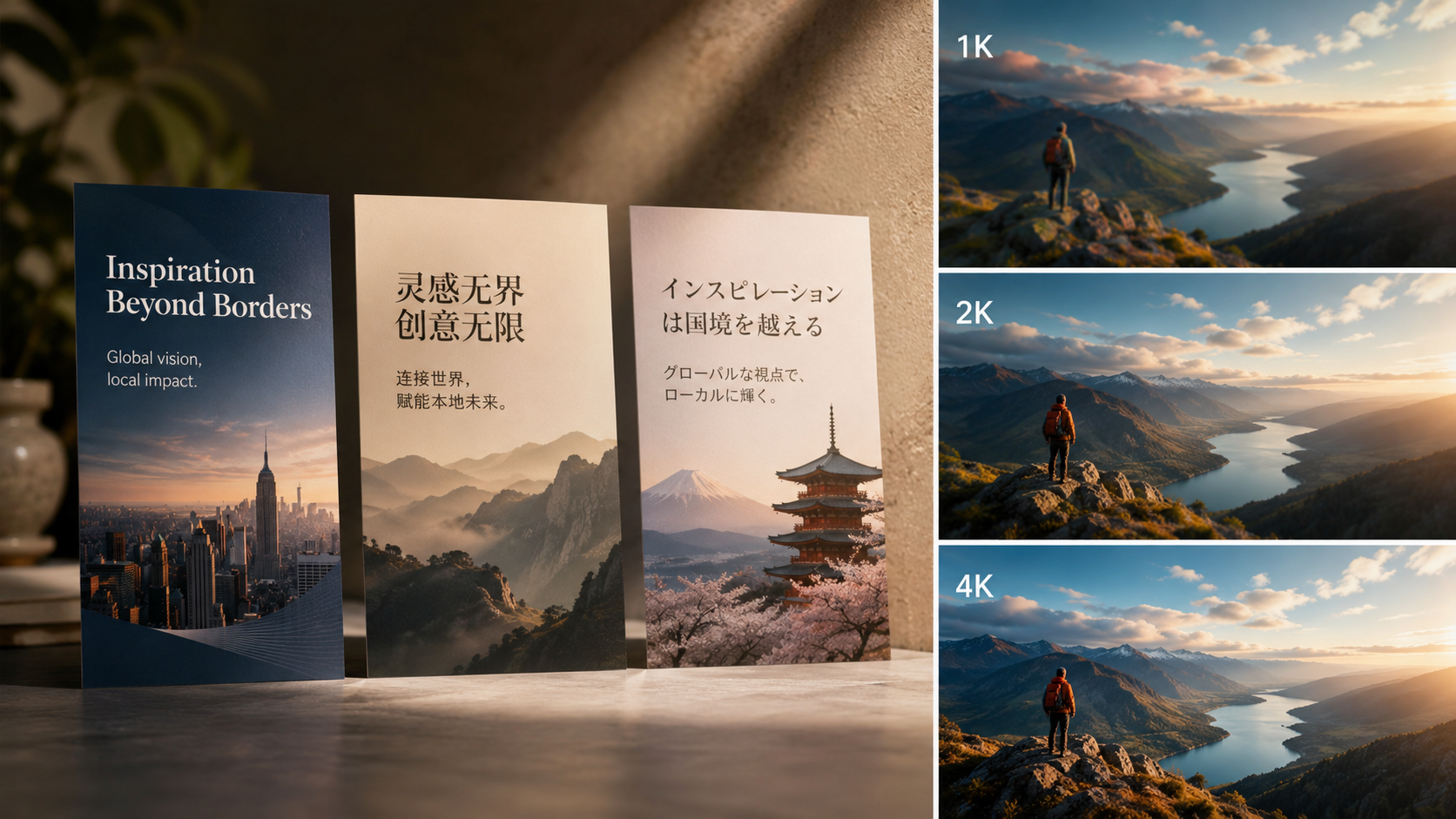
High-Resolution Output
Export options include 1K, 2K, and 4K.
Best for: Print-ready work and premium digital assets
Strength: Flexible output for different channels
Trade-off: Larger outputs may increase generation time
API and Workflow Integration
The platform supports API-based generation for batch tasks, automation, and collaboration.
Best for: Teams with repeatable creative operations
Strength: Scales better than manual-only tools
Trade-off: Requires implementation and maintenance
Practical Decision Guide: Which Users Need Which Capability?
| User Type | Most Important Capability | Why |
|---|---|---|
| E-commerce team | Product consistency and high-res output | Needed for listings and ads |
| Marketing team | Style consistency and multilingual typography | Needed for campaigns across regions |
| Agency | Fast iteration and reusable styles | Needed for pitching and concept production |
| Product team | API integration and batch generation | Needed for automation |
| Solo creator | Speed and ease of use | Needed for lightweight production |
Best Scenarios for Using Nano Banana
Scenario 1: Ecommerce Hero Images
Use Nano banana to produce clean, high-impact hero shots for product pages.
Why it works:
- Fast generation
- Strong visual polish
- Easy to create multiple versions
Scenario 2: Marketing Posters and Campaign Assets
Use it to create poster-style creatives with consistent branding and multilingual text.
Why it works:
- Supports typography
- Keeps style coherent
- Good for local and global versions
Scenario 3: Storyboards and Ad Series
Use reusable styles and characters to build sequential visuals.
Why it works:
- Maintains continuity
- Makes series production faster
- Helpful for narrative planning
Scenario 4: Batch Content Production
Use the API to automate repeated generation tasks.
Why it works:
- Scales for teams
- Reduces manual effort
- Supports workflow integration
Limitations to Keep in Mind
Even strong models have constraints. When evaluating Nano banana, consider these practical limits:
- Complex prompt logic may still need revision
- Highly detailed text layouts should be checked manually
- Visual consistency improves when references are clear and aligned
- API integration is powerful but requires technical setup
- Final commercial assets should always go through quality review
If your team needs absolute pixel-perfect control for every asset, you may still want a designer-led workflow alongside the model.
Recommendation by User Level
Best Choice for Beginners
If you are new to AI image generation and want quick visual results, Nano banana is a strong starting point.

Why:
It combines generation, editing, and consistency in one workflow, which lowers the learning curve.
Best Choice for Marketing Teams
If you need campaign visuals, multilingual creatives, and repeated brand assets, Nano banana is a strong fit.
Why:
Its typography, consistency, and resolution options make it suitable for production.
Best Choice for Agencies
If you need rapid concept exploration and multiple creative directions, Nano banana is worth adopting.
Why:
It supports fast iteration and reusable visual systems.
Best Choice for Product Teams
If you want automation, batch generation, and workflow integration, Nano banana is a good option.
Why:
The API makes it suitable for scalable creative operations.
Best Choice for Advanced Commercial Work
If you need export-ready visuals with clean output and multiple resolution levels, Nano banana is highly practical.
Why:
It is designed for commercial-ready delivery and reusable creative pipelines.
Final Verdict
If your goal is to compare, screen, and decide whether a visual model is right for production, Nano banana stands out for its balance of generation quality, semantic editing, multilingual typography, style consistency, and API support.
Layered Recommendation
- Choose Nano banana first if you need fast, high-quality image generation with strong editing and consistency.
- Choose it for teams if you care about campaign series, multilingual assets, and repeatable brand visuals.
- Choose it for automation if you need API-based generation or batch workflows.
- Use caution if your workflow demands strict manual precision on every design detail.
For most marketing, ecommerce, and content production scenarios, google nanobanana is a compelling choice because it is not just an image generator—it is a visual production tool built for repeatable, scalable output.
FAQ
What is google nanobanana used for?
Google nanobanana is commonly used for text-to-image generation, image editing, multilingual typography, and consistent visual production across campaigns and content formats.
Can Nano banana be used for commercial projects?
Yes, it supports clean exports and commercial-ready workflows. However, teams should still review usage terms and internal approval requirements before publishing.
Does Nano banana support API integration?
Yes. It is designed to connect into API-based workflows for batch generation, automation, and team collaboration.
Is Nano banana good for multilingual designs?
Yes. One of its strengths is accurate typography across multiple languages, including English, Chinese, and Japanese.
What resolution options are available?
Nano banana supports 1K, 2K, and 4K outputs, making it suitable for both digital and print-oriented use cases.
Who benefits most from Nano banana?
Marketing teams, ecommerce teams, creative agencies, product teams, and independent creators can all benefit, especially when they need fast iteration and consistent visuals.