Prompt Library

AI Prompt Library

Curated image, video and web design prompts from creators around the world. Copy any prompt, swap the subject or style, and generate with the latest models.

4,387 prompts · Updated daily · 100% free

289 prompts

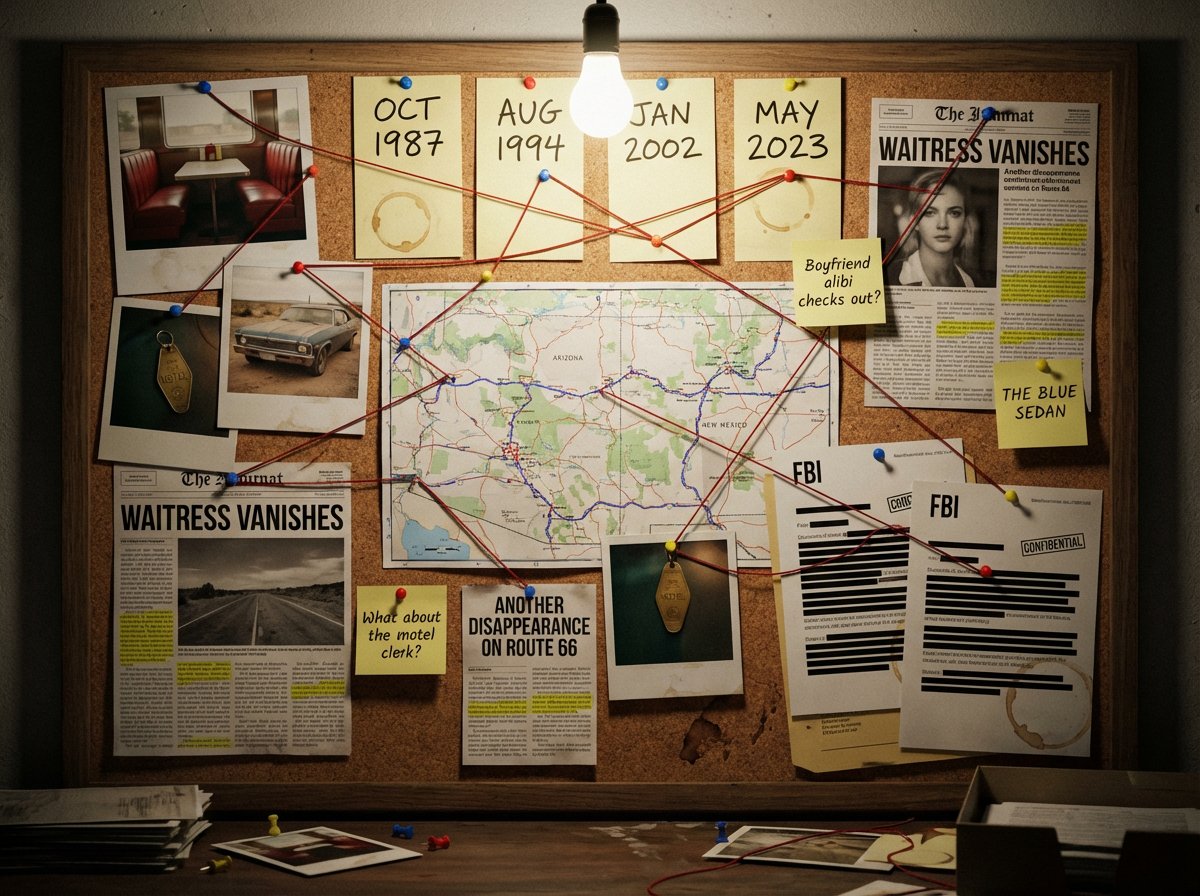
Noir Detective Evidence Board Visualization

Noir Detective Evidence Board Visualization

A detective's evidence board investigating {argument name="subject or mystery" default="[SUBJECT/MYSTERY]"}. Cork surface covered with pinned items: polaroid photographs with handwritten dates, a street map with circled locations, newspaper clippings with highlighted passages, sticky notes with theories and question marks, and printed documents with redacted black bars. Red string connects related evidence across the board, creating a web of connections. Thumbtacks in primary colors. A single bare bulb casts dramatic shadows. Coffee ring stains on some papers. The atmosphere is obsessive, late-night, noir—someone has been piecing this together for months. A few pins have fallen, suggesting frantic recent activity.

Nano Banana Pro Prompt Summary and Templates

Nano Banana Pro Prompt Summary and Templates

@Ankit_patel211 Use detailed JSON prompts to generate composite posters of four-country urban life in anime-style GTA, with exquisite detail restoration @aleenaamiir Share the “Impossible Construction” prompt to generate surreal scenes of miniature workers assembling giant everyday objects @Dari_Designs Showcase the powerful ability of Nano Banana Pro to generate infinite design mockup variations, using a Christmas limited edition example @Naiknelofar788 Fully share the 3x3 grid “Getting Ready” prompt to generate multi-stage beauty scenes with consistent identity @kohaku_00 Christmas themed collection of cute girls with multiple characters, rendered with exquisite holiday atmosphere @underwoodxie96 Share detailed sports-themed prompts, comparing dynamic runner posters generated by Nano Banana Pro with other models @AllaAisling Share the mirror infinite reflection product photography prompt to generate optical illusion effects for high-end luxury goods @LudovicCreator Share the “Celestial Halo” dreamy prompt template to generate colorful glowing portrait effects @berryxia Detailed explanation of the meta-prompt architect character design principles and sharing the complete prompt template @madebygoogle Official release of the holiday Nano Banana Pro wallpaper series, rich in Christmas atmosphere @AllaAisling Share the miniature diorama scene prompt to generate miniature landscapes of warm holiday life @treydtw Explain the difference between Skill and Subagent concepts in AI agents using the analogy of renovating a house @Gdgtify Improve the miniature kitchen prompt for the origin of food, generating a historical scene box of Persian kebabs @notoro_ai Close-up of a cute girl with glasses, exquisite makeup and soft lighting @SDT_side Share the extreme macro portrait close-up prompt, generating serene skin texture and eye detail

Isometric 3D Miniature City Diorama with Holiday Theme

Isometric 3D Miniature City Diorama with Holiday Theme

Present a clear, 45° top-down isometric 3D miniature cartoon scene, depicting the classic architecture or landmarks of [{argument name="city" default="Shanghai"}] and placing it at the center of the composition. Use decorations, twinkling lights, and appropriate seasonal details (defaulting to Winter) corresponding to the [{argument name="holiday" default="New Year's Day"}] to depict the city as a [{argument name="holiday" default="New Year's Day"}] theme filled with festive atmosphere. Use soft and delicate textures, realistic PBR materials, and soft, realistic lighting, creating subtle shadow effects. Create a small, neat diorama-style city base with clean edges. Use a clean [{argument name="holiday" default="New Year's Day"}] background color that contrasts sharply with the scene. In the top center, display the text [{argument name="city" default="Shanghai"}] in bold, large font. Immediately below it, display “[{argument name="holiday" default="New Year's Day"}] Special Edition” in medium font. (Optional) Place a small square flag icon below the text. All text must automatically match the background contrast (white or black). Composition: Perfectly centered, 1080×1080 square, ultra-minimalist holiday diorama aesthetic

Advanced Commercial Food/Product Poster Template with Vertical Layering

Advanced Commercial Food/Product Poster Template with Vertical Layering

Aspect Ratio: 9:16 Vertical Image Style (Adjustable based on subject): High-end commercial photography, dark luxurious feel, cinematic texture, hyper-realistic, high detail Background (Adjustable based on subject): Pure black background (#000000), no pedestal, no platform, no ground, all subjects and elements suspended in space [Subject] The core display subject is: [{argument name="core display subject" default="User provided subject"}] It is mandatory to use your database knowledge and internet search to deconstruct the subject into multiple “identifiable, understandable, and hierarchical components.” Please determine the deconstruction logic and hierarchy based on the subject's characteristics. [Overall Composition] The overall composition uses a “Vertical Layered Suspension Structure,” forming a clear visual reading path from top to bottom. There is a clear spatial gap between each layer, and layers are connected by air, steam, light, and shadow, rather than direct contact. The visual axis is centered in the frame, making the composition stable yet dynamic. [Title System (Top)] At the top center of the frame, a high-end main title is suspended: Copywriting content is automatically generated by AI based on the subject (can include Chinese main title + English subtitle) Font Style (Adjustable based on subject): Handwritten brush calligraphy style / Natural writing feel Material (Adjustable based on subject): 3D metallic texture, imitating forged gold metal Feature Characteristics (Adjustable based on subject): Heavy, 3D, with realistic metal reflection, highlights, and shadow layers [Layered Structure (Middle Subject Area)] Based on the subject, autonomously generate 4–6 logically clear suspended levels, such as: Raw Material Layer / Composition Layer / Key Element Layer / Core Structure Layer / Atmosphere or Emotion Layer Each layer has clear material, color, texture, and volume Air and space are left between layers; they are not crowded or stacked All middle layers: Are in slight steam, heat, or air turbulence Have fine particles, mist, vapor, or dust floating Are controlled by a unified lighting system, maintaining overall consistency [Transition Zone (Important)] Between the subject layering and the final presentation, deliberately reserve a “significantly larger spatial gap”: This area is mainly composed of air, steam, smoke, energy flow, and light mist No physical objects are placed here The function is to create rhythm, breathing room, and visual contrast To reinforce the transition “from structure to finished product / from process to result” [Final Product Layer (Bottom)] The bottom of the frame presents the complete, final form of the subject: State is “finished state / peak state / most attractive presentation” Texture is full, details are rich, with strong appeal or infectivity Naturally blends with the background but clearly stands out Steam, smoke, or energy sensation continuously rises from this area [Information Annotation System] Appropriately add descriptive annotations to the image: Bilingual Chinese and English Text is restrained and elegant Use thin lines or arrows to point to the corresponding level Annotation content is automatically generated by AI based on the subject Does not overshadow the main subject, only serves for “advanced interpretation” [Signature / Brand Element] Bottom right of the frame: A brand signature or signature Logo is suspended Style is consistent with the main title (brush calligraphy feel, metallic gold, 3D, etc.) Can be paired with slight starlight or shimmering effects to emphasize luxury At the bottom, there is a one-sentence commercial hit SLOGAN tailored to the subject [Lighting System] Professional studio lighting at 45° angle Warm contour light (rim light) outlines structural edges Local highlights emphasize material realism Steam and smoke are cut by the light, forming volumetric light [Overall Temperament] Dark tone, restrained, expensive, or on one side of the bottom (adjustable based on subject) Possesses “soul / warmth / handmade feel / high-end commercial aesthetic” Suitable for brand posters, key visuals, and cover-level commercial displays

Dynamic Split Magazine Cover Thumbnail Prompt

Dynamic Split Magazine Cover Thumbnail Prompt

metadata: title: "Nano Banana Pro Design Course Eyecatch - Dynamic Split Magazine Cover" model_context: "High-End Magazine Cover aesthetic with Dynamic Diagonal Split and Anime Art" image_structure: composition_type: "Magazine Cover Layout with Diagonal Split Background" visual_flow: "Dynamic Diagonal Split (Bottom-Left to Top-Right) matching Character's Motion. Text layers overlap this flow." layers: layer_background_split: shape: "Full screen, diagonally split from bottom-left corner to top-right corner." area_top_left: color: "Deepest Matte Black (#0A0A0A) with subtle, minimalist geometric texture." mood: "Dark, quiet, foundational space behind the character." area_bottom_right: color: "Dark Charcoal Grey (#222222) transitioning to a slightly lighter dark grey gradient towards the top right." mood: "Brighter dark space, suggesting light and future direction." divider: style: "A sharp, clean diagonal line, potentially with a very subtle, thin glowing edge (matching character's accent color) to define the motion path." layer_masthead_top: location: "Top section, spanning the full width." elements: - type: "Small Top Text" text: "AI ART | PROMPT ENGINEERING | MONETIZATION" style: "Small, Light Grey text. Ensures readability against the split background." - type: "Main Brand Logo (Huge)" text: "NANO BANANA PRO" style: "Massive, bold, White or Metallic Silver sans-serif font. The character's head overlaps the bottom of these letters." - type: "Tagline" text: "AI that opens up the future of design" style: "Medium size White text below the main logo." layer_character_main: location: "Center, following the diagonal split from bottom-left towards top-right." content: "High-quality Japanese Kawaii Anime Girl (Nano Banana Pro generation result)." style: "2D Cel-shaded anime art, cinematic quality, highly detailed." details: subject: "Dynamic anime girl with futuristic creative gear." appearance: hair: "Vibrant neon yellow/orange glowing against the dark background." clothing: "Sleek black/white futuristic suit with prominent glowing neon yellow stripes matching the motion direction." pose: "Dynamic flying/ascending pose, body aligned with the diagonal split, looking towards the top right. Motion blur effects on extremities to enhance speed." depth_effect: "Head overlaps masthead. Body interweaves with the main title. The character pops out against both dark background zones." layer_foreground_text: elements: - type: "Main Feature Title (Interwoven)" text: "D E S I G N C O U R S E" location: "Center, across the character's body, following the diagonal flow." style: "Large, bold, White sans-serif text. Character elements pass through/over/behind letters for 3D effect." - type: "Teaser Text Block (Left)" location: "Middle Left (mostly over the darker Top-Left background area)." text: "Start from zero,\nprofessional-grade creative work.\nMaster the next-generation production workflow\nusing AI."

Horror-Style Text Banner Prompt (Kawakuchi Hiro Exploration Team Style)

Horror-Style Text Banner Prompt (Kawakuchi Hiro Exploration Team Style)

Solid black background (#000000). Place the following text in the center using solid red (#ff0000) characters: "{argument name="text line 1" default="Mystery of the Darkness"} {argument name="text line 2" default="The mysterious glowing river"} {argument name="text line 3" default="Existed!!"}" (Line break into 3 lines) ・The font should be a rough, powerful, horror-style brush script. ・The design should have the momentum of a brush, with rough textures like fading or ink bleeding. ・The characters should be thick, uneven, sharply pointed, eerie, and impactful. ・A fierce, handwritten design expressing fear and shock. ・A design written with a thick brush, having a vertical tendency, as if written by a strong man with a calligraphy brush.

Christmas Cake with Text Plate Prompt

Christmas Cake with Text Plate Prompt

Create a high-quality, vertical poster-style illustration with a clean and professional composition. **[Main Subject and Action]** The character from the reference image is centrally placed, sitting comfortably on the top edge of a large, lavishly decorated round Christmas cake. Her legs and feet are fully visible, dangling slightly over the side of the cake. **[Cake Description (Not formed by text)]** The cake itself is a traditional cylindrical shape and is not formed by text. It features realistic textures: : Thick, fluffy white whipped cream 'snow,' moist sponge layers, glossy red strawberries, holly leaf decorations, and dripping strawberry glaze (syrup). **[Text Element and Placement]** A "separate" rectangular dark chocolate plate is firmly attached to the front (vertical surface) of the cake base. On this plate, the specific text "{argument name="desired string" default="desired string (Japanese or English is OK)"}" is elegantly written in raised gold icing script. The text is entirely contained within the plate. **[Environment and Lighting]** The background is a warm, festive scene with soft golden bokeh light, miniature Christmas elements, and a gentle touch of falling gold dust. Cinematic lighting emphasizes the contrasting textures of the character, the creamy cake, and the glossy chocolate plate. High resolution, with sharp focus on the character and the text plate.

Nano Banana Pro Calligraphy Font Generator

Nano Banana Pro Calligraphy Font Generator

---------- Solid white background (#ffffff). Write the text "{argument name="text to write" default="謹賀新年"}" in solid black (#000000) vertically in the center (single line, no line breaks). ・The font should be a powerful brushstroke style, skillfully reproducing Japanese calligraphy and ink expressions. ・Dynamic and powerful, expressing the momentum of ink splatters. ・There should be a contrast between stillness and movement, with all lines fluidly expressing the trajectory of the brushstrokes. ・A design of extremely high quality and artistic merit, written by a master calligrapher. ----------

TV Series Recommendation Engine & Miniature Set Designer

TV Series Recommendation Engine & Miniature Set Designer

<instructions> Act as an elite TV/limited-series recommendation engine + miniature soundstage designer. Step 1: User provides a series title or image. Analyze: tone, pacing, world rules, character dynamics, cinematography style, era, emotional aftertaste. Step 2: Select 4 under-the-radar series/limited series with the closest vibe match (not the usual top-10 recs). Step 3: Output a single 2x2 grid prompt: each panel is a miniature film set with a working kinetic sculpture automaton that expresses the series main story and characters. Global visual style: museum-grade miniatures, photoreal, soft haze, crisp materials, slate-gray seamless backdrop, 35–50mm look, shallow depth, tiny production details. Under each panel: engraved plate “title (year-year)”. ni extra text. Return only the final image prompt.</instructions>

Ordinary Object to Massive Monument Transformation

Ordinary Object to Massive Monument Transformation

Transform {argument name="everyday object" default="EVERYDAY OBJECT"} into a massive real-world monument. Surface materials are physically accurate, with visible wear, scratches, dust, and scale references like people and vehicles. Shot from a low-angle cinematic perspective, realistic daylight, ultra-detailed textures.

RPG Status Screen X Profile Prompt

RPG Status Screen X Profile Prompt

GENERAL STYLE & MOOD: A business card visual styled as a “Character Status Screen,” inspired by 1980s–1990s Japanese RPGs (Famicom–Super Famicom generation). The overall composition should be in pixel art style (8-bit to 16-bit), with a retro yet refined UI design. The layout should be organized like an in-game menu screen, maintaining a nostalgic feel while preserving modern resolution clarity. SUBJECT: Based on the icon in the attached image (Image 1) and the specified profile information, re-interpret the subject as an “RPG Character” and present the business card information in a status screen format. 1. Character Display: - Reconstruct the icon from the attached image (Image 1) into dot art (pixel conversion). - Place it as a character portrait on the left side of the status screen. - Use RPG-style UI borders (rounded corners or dotted lines). 2. Information Source and Character Analysis: - Subject: {argument name="subject" default="hAru_mAki_ch (https://t.co/AfDkdOaTPw)"} - Analyze the above profile and recent activities (posting frequency, technical field, content of statements, evaluations) to automatically calculate various RPG parameters. 3. Character Name/Title: - NAME: {argument name="name" default="Maki @ Sunwood AI Labs."} - HANDLE: {argument name="handle name" default="hAru_mAki_ch"} - CLASS (Occupation): Name the estimated occupation based on activities in an RPG style. Examples: - AI Mage - Prompt Alchemist - Tech Sage - Digital Architect STATUS PARAMETERS (Calculated based on Activity): The following parameters should be quantified (1–99) based on actual activity status: - LV (Level): Calculated from years of activity × posting frequency × consistency - INT (Intelligence): Calculated from technical posts, frequency of specialized terminology use, and abstraction level of thought - TEC (Technical Skill): Calculated from the volume of AI / development / research / implementation output - CRE (Creativity): Calculated from the frequency of unique perspectives, prompt design, and idea posts - COM (Communication Power): Calculated from follower count, engagement, and post diffusion power - EXP (Experience Points): Comprehensive evaluation of past achievements, projects, and continuous activities * Ensure each value maintains a relative balance typical of an RPG (not all stats should be uniform). UI & TYPOGRAPHY: - Font should be a dot font (8-bit RPG style). - Text must be perfectly legible, without blurring or distortion. - Primarily use Japanese UI, with some English status names concurrently used. COLOR PALETTE: - Use a color palette extracted from the attached image (Image 1). - Composed using a limited color count reminiscent of 16-bit RPGs. - Background should be dark-toned, with high contrast for text and gauges. GRAPHIC ELEMENTS: - Status bars displayed as pixel gauges. - Icons (sword, book, gear, star, etc.) should also be unified in dot art. - UI borders and dividers should be in the style of an RPG menu. COMPOSITION: - The overall composition should be a “screenshot of an in-game status screen.” - While mindful of business card size ratio, maintain high information density. - Lay a faint dot pattern or grid in the background. CONSTRAINTS: - Name, handle, and URL must be accurately and exactly displayed. - Exclude meaningless strings or distorted characters. - Strictly adhere to the pixel art style; photo-realism is prohibited. - Maintain a consistent world view as an RPG UI. - Dynamically reconstruct based on the input {argument name="argument" default="argument"} and Image 1.

Mechanical Keyboard Themed Art Poster Prompt

Mechanical Keyboard Themed Art Poster Prompt

A 16:9 horizontal composition art poster with a mechanical keyboard theme. The left quarter of the frame displays a bust close-up portrait of the [{argument name="character name" default="character name"}], shown from the shoulders up, with intense eyes. The edges use a soft feathering effect to naturally blend into the background. Light particle effects and color gradient haze surround the figure. The right three-quarters of the frame: the upper half presents an artistic display of keycaps: 5 to 7 exquisite mechanical keyboard keycaps scattered in the air in an elegant arc, each showing different angles and details. The keycap color scheme is extracted from the character's [{argument name="main color 1" default="cherry blossom pink"}], [{argument name="main color 2" default="creamy white"}], and [{argument name="accent color" default="coral red"}]. The keycap surfaces are printed with [{argument name="theme element" default="character Q-version silhouette/exclusive icon/gradient texture"}], presented using [{argument name="keycap material" default="PBT matte/resin translucent"}] material. Chinese artistic text annotations float next to each keycap, using Z-Cool Gao Duan Hei or YouShe Ti Hei fonts, with content such as "{argument name="annotation 1" default="Cherry Pink Main Key"}", "{argument name="annotation 2" default="Gradient Coating"}", "{argument name="annotation 3" default="Dual-Color Translucent"}", "{argument name="annotation 4" default="Character Print"}", "{argument name="annotation 5" default="Metal Spacebar"}", etc., describing the craftsmanship, with slight glow effects and outlines. The lower right three-quarters of the frame are evenly divided into three areas: the left grid shows a top-down flat lay view of the complete mechanical keyboard, [{argument name="keyboard layout" default="68-key compact layout/anodized aluminum base"}], with the Chinese annotation "{argument name="left grid annotation" default="Complete Layout"}" at the bottom; the middle grid shows a macro close-up of the keyboard side profile, emphasizing craft details and material layers under light and shadow, with the annotation "{argument name="middle grid annotation" default="Ingenious Craftsmanship"}" at the bottom; the right grid shows an atmospheric setup of the keyboard in a [{argument name="scene 1" default="cozy desk scene/cafe table/workbench"}], with lifestyle props like [{argument name="props" default="coffee cup/green plant/notebook"}], with the annotation "{argument name="right grid annotation" default="Aesthetics of Life"}" at the bottom. The overall background uses a [{argument name="background effect" default="ink wash/particle light effect/gradient matte"}] effect, with the main color transitioning from [{argument name="color 1" default="color 1"}] to [{argument name="color 2" default="color 2"}] extracted from the character, darker on the left and lighter on the right. Fine light spots and flowing color clouds are scattered in the background, creating a [{argument name="atmosphere" default="dreamy gentle/cyber tech/retro elegant"}] atmosphere. A large title text is centered at the bottom of the frame: "{argument name="main title" default="Character Name Themed Custom Keyboard"}", using bold Chinese artistic characters with a metallic texture or glowing effect. The image has no obvious dividing lines, with areas naturally transitioning through light, shadow, depth of field, and visual reality. The overall presentation has the visual texture of a fashion magazine cover, with moderate color saturation, rich layers, combining both artistic and product display functions. 4K ultra-high resolution, 16:9 horizontal composition, suitable for social media impact.

City Poster Digital Art Prompt

City Poster Digital Art Prompt

A city rendering digital art poster for [{argument name="city name" default="city name"}]. The core subject of the image is a miniature island floating above white clouds, shaped like the selected city and occupying most of the frame. The shape of the island is similar to the city's map outline, seamlessly integrating the city's unique iconic landmarks, natural landscapes, and cultural elements. Include birds unique to the city, cinematic lighting, vibrant colors, aerial perspective, and sun reflection effects. Buildings should not be too numerous or dense. The island showcases a seamless blend of history and modernity. One part features the city's most representative ancient historical buildings; the other part smoothly transitions into the city's landmark buildings and skyline view. The island floats above a vast sea of clouds. The sea of clouds is rendered using the traditional art style of the city's cultural sphere. 3D text of the city's Pinyin or English name floats above the miniature island. This group of text acts like a miniature ecological device where ecology and culture coexist. Around the frame and the main subject, layer a minimalist, elegant information layout layer with the texture of a museum display panel. Primarily retrieve relevant city information, using classic serif fonts for main information and extremely fine minimalist sans-serif fonts for auxiliary data. In the corners of the frame, arrange the information like a classical atlas or a high-end magazine title page. Use serif fonts to label the city's geographical coordinates, alias, or founding year, and the current weather, serving as decorative background information. The overall layout uses extensive negative space, is restrained, clean, and balanced, as if appreciating a precious work of art. Style requirements: Octane Render, C4D, Isometric City, Micro World, Living Ecosystem, 8k Resolution. DreamWorks style, 3D modeling, delicate, soft light projection.

Creative Typography Poster Prompt for Nano Banana Pro

Creative Typography Poster Prompt for Nano Banana Pro

A creative layout poster. The main subject of the image is a silhouette of a computer, composed entirely of dense Chinese words of different sizes (any words related to computers are acceptable). The background is clean beige. The text color shows a gradient from dark brown to light brown, simulating the texture of a computer. 9:16 aspect ratio, 4K ultra-high definition.

Realistic Character Snow Sculpture Generation

Realistic Character Snow Sculpture Generation

[Settings] [Character Appearance] = "Input Image" [Title] = {argument name="Title" default="Lovart is the Best"} Conversion Rules: A photograph of a giant snow sculpture, about 3 meters tall, modeled after the [Character], taken at a Japanese snow festival venue. IMPORTANT: This statue is made entirely of "pure white snow." No paint is used, and the color is completely solid white. The character's eyes and clothing patterns are expressed only by the unevenness and shadows of the snow. The snow sculpture is in a "high relief" style, carved as if half-embedded in a giant snow wall in the background. The character is taking a dynamic dance pose with a sense of movement. There is a snow pedestal at the base of the snow sculpture, and the text "[Title]" is deeply carved into the surface of the pedestal in the snow. A square standing sign, printed with the reference "Color Illustration" and "[Title]" (only the sign is colorful), is placed on the snow surface right next to the snow sculpture. The angle is a composition looking up diagonally from a person's eye level. The snow surface has the slightly rough texture of compacted snow. Winter natural light. Art Style: Daytime natural light, clear winter air, 4K image quality

Victorian Gothic Royal Portrait Magazine Cover Prompt

Victorian Gothic Royal Portrait Magazine Cover Prompt

Generate a 9:16 vertical, realistic photo of a "Victorian Gothic Royal" portrait: Use the uploaded FACE_REF as the character identity reference, 100% restoring the facial features and bone structure; the person is wearing heavy-duty court attire in the style of the "Victorian Era (19th Century) Court Gown" (corset, large crinoline, lace/velvet, royal jewelry), photographed next to the Tower Bridge or the Palace of Westminster (Big Ben) in London. The image should have photography, styling, and cover design quality comparable to 'Harper’s Bazaar', maintaining the magazine's consistent design style (Chinese and English design). 【INPUTS | Input】 FACE_REF: Uploaded facial feature reference image (identity lock) 【ABSOLUTE PRIORITY | Identity Lock (Highest Priority)】 100% restoration of FACE_REF's facial features and bone structure: Eye distance, nose bridge and wings, lip shape, jawline, and cheekbone structure must be completely consistent, with no deviation. Realistic skin texture: Visible subtle textures and pores; avoid excessive smoothing or 'influencer' filters. Adult female image (adult). 【SHOT TYPE | Two View Options (Model randomly selects one, must be realistic and consistent)】 A) Half-body cover: From the chest to above the waist, with jewelry, lace neckline, and eyes being the clearest (Primary recommendation) B) Full-body cover: Complete presentation from head to toe, showing the full silhouette of the huge crinoline combined with the London landmark, strong perspective (Alternative) (Regardless of A/B: Must maintain a "cover composition," with white space reserved for typography, but without torn paper/hand-drawn effects.) 【LOCATION | Scene (London, UK)】 London Landmark: By the River Thames, with the magnificent Gothic architecture of the Palace of Westminster (Big Ben) or the Tower of London Bridge in the background. Weather option (random): 1) London Fog (classic foggy texture, soft and mysterious light) 2) Just after rain (wet ground reflection, lead-gray sky) Clean background: No tourists, no modern signs, no mobile phone status bar UI, no watermarks or subtitles. 【LIGHTING & CAMERA | Photographic Quality (Magazine Grade)】 Lens feel: 85mm portrait quality (half-body) or 50mm/70mm (full-body), shallow depth of field, eyes are the sharpest. Lighting: Overcast diffused light + dramatic fill light (emphasizing facial structure); diamonds/gems must have realistic fire; velvet texture must be deep. Color: High-end cinematic feel, low-saturation blue-gray environment combined with the dark tones of the clothing (red/blue/black) to form a Gothic aesthetic; overall clean, transparent, and luxurious. 【WARDROBE | Victorian Court Gown (Heavy-duty, Sculpting, Intricate Details)】 Target aesthetic: "Wasp waist, large skirt, layered lace, heavy velvet, crown, queenly aura." Silhouette and Layers (X-shaped tailoring) Upper body: Highly structured corset, square or high neckline, puff sleeves or leg-of-mutton sleeves Lower body: Huge crinoline or bustle, with noticeable stacking design at the back waist, skirt trailing on the ground Decoration: Abundant ruffles, bows, dangling tassels Fabric and Craftsmanship (Heavy craftsmanship must be "visible") Main fabric: Heavy velvet, taffeta, Chantilly Lace Main techniques: Beading, gold thread embroidery, ribbon weaving Pattern themes: Damask, roses, thistle (symbol of Scotland), paisley pattern Details: Lace gloves, neck ornament (Choker), medal/brooch Headwear (Royal Jewelry Headpiece) Core structure: Victorian small crown (Tiara) or feather headpiece Decoration: Diamonds, sapphires, pearls Earrings/Necklace: Extremely exaggerated diamond necklace, drop earrings 【COLOR MATRIX | Color Matrix Pairing (Must be executed, and must be "Royal Dark Colors")】 (Deep luxury of the late Victorian era) Randomly select 1 set from the following three "Main Color Schemes" for the [Base Color/Large Area Main Fabric Color]. Scheme G (Royal Blue Base): Base Color: Deep sapphire blue/midnight blue (velvet texture) Embroidery/Decoration: Silver lace, diamonds, sapphires Scheme A (Victorian Red Base): Base Color: Wine red/Burgundy red (deep passion) Embroidery/Decoration: Black lace, gold embroidery, rubies Scheme R (Mourning Black Base): Base Color: Ink black (Black Jet, extremely Gothic) Embroidery/Decoration: Black beads, black lace, small amounts of gold or silver highlights 【Color Execution Rules】 Colors must be deep and rich, reflecting the majesty of the "Empire on which the sun never sets" and Gothic mystery. 【POSE | Cover Pose (Majestic, Stiff, Queenly Aura)】 Half-body: Chin slightly raised, cold gaze, one hand gently touching the necklace Full-body: Standing tall (like a portrait painting), hands clasped on the crinoline, overwhelming presence Expression: Serious, arrogant, imperious; absolutely no smiling (Victorian style). 【OUTPUT | Output】 1 vertical 9:16 realistic magazine cover photo Random: Half-body or Full-body (A/B selection) Random: Fog or Rain (Weather selection) Random: Sapphire Blue / Wine Red / Ink Black (Color matrix selection) Styling: Victorian court gown direction + Crown/Choker + Corset and large crinoline + Velvet and lace

Hulk Crushing Pepsi Can Cinematic Prompt

Hulk Crushing Pepsi Can Cinematic Prompt

{ "concept_id": "hulk_pepsi", "visual_breakdown": { "focus_object": "Crushed Pepsi Can", "character_element": "Hulk's Giant Hand", "environment": "Smoky City Ruins" }, "artistic_direction": { "lighting": "Explosive/High Contrast", "mood": "destructive" }, "generation_command": { "aspect_ratio": "7:9", "concise_prompt": "Hulk's giant hand hovering over a crushed {argument name="soda brand" default="Pepsi"} can embedded in pavement, smoky ruins, explosive action movie style. --ar 7:9" } }

Feature Article Generation Prompt for K-Pop Magazine

Feature Article Generation Prompt for K-Pop Magazine

You can request article writing and formatting specifications from Nano Banana Pro. [Prompt] Use the search function to investigate the significance of the award won by '{argument name="group" default="K-Pop Demon Hunters"}' at the {argument name="awards" default="2025 MAMA AWARDS"} and the latest achievements of virtual idols ({argument name="virtual idols" default="PLAVE, MAVE:, etc."}). Write a feature article titled "{argument name="article title" default="Virtual Idols Stepping Off the Screen: The New Standard of K-Pop in 2026"}". Submit this article in the style of the futuristic entertainment magazine, "《{argument name="magazine name" default="K-POP HUNTERS"}》". The magazine cover should include {argument name="cover image" default="an image of a three-member female virtual group performing"}, and the two internal pages should be composed with {argument name="layout style" default="a neon-toned layout that captures the atmosphere of a hologram concert"}.

Image-to-Snow Sculpture Conversion Prompt for Nano Banana Pro

Image-to-Snow Sculpture Conversion Prompt for Nano Banana Pro

【Settings】 [Character Appearance] = {argument name="Character Appearance" default="A girl with twin tails and a black cloak and a girl in a sailor uniform"} [Title] = {argument name="Title" default="The two are good friends"} Conversion Rules: - A photograph of a giant snow sculpture, about 3 meters high, modeled after the [Character], taken at a Japanese snow festival venue. - Important: This statue is made entirely of “pure white snow.” No paint is used, and the color is completely solid white. - The character's eyes and clothing patterns are expressed only by the unevenness and shadows of the snow. - The snow sculpture is in the style of “high relief,” carved as if half-buried in a giant snow wall in the background. - The character is taking a dynamic dance pose full of life. - There is a snow pedestal at the base of the snow sculpture, and the words “[Title]” are deeply carved into the snow on the surface of the pedestal. - A square standing sign, printed with the reference “color illustration” and “[Title]” (only the sign is colorful), is placed on the snow surface right next to the snow sculpture. - The angle is a composition looking up diagonally from a person's eye level. - The surface of the snow has a slightly rough, compacted snow texture. Winter natural light. Art Style: - Daytime natural light, clear winter air, 4K image quality

High-Contrast Palm Shadow Portrait

High-Contrast Palm Shadow Portrait

Create a stunning close-up portrait of a woman with wild, curly hair, wearing a simple white tank top. She is leaning against a wall under the afternoon sun. The light is filtering through the leaves of a palm tree, casting sharp, high-contrast shadows of the fronds across her face and chest. One eye is illuminated by a patch of golden light, while the other is hidden in the leaf shadow. The background is a deep, shadowed terracotta wall. Cinematic, vibrant colors, sharp focus, sun-drenched aesthetic. Use aspect ratio 3:4.

9-Panel Christmas Movie Scene Collage Prompt

9-Panel Christmas Movie Scene Collage Prompt

[Global Instruction]: A 3x3 grid collage, all 9 panels must feature the exact same female character. Strictly maintain facial features consistent with the reference image. Do not change her facial features, only change her expression, makeup, and styling to match each movie theme. Panel 1: '{argument name="movie 1" default="Love Actually"}' style - Airport farewell scene, wearing a Santa hat, holding a wrapped gift, warm embrace, background features a giant airport Christmas tree and string lights, soft lighting. Panel 2: '{argument name="movie 2" default="Home Alone"}' style - Surprised, exaggerated expression covering her face, wearing a crooked Santa hat, background features a home Christmas tree, gift piles, and decorative lights, comedic effect. Panel 3: '{argument name="movie 3" default="The Polar Express"}' style - By the train window, wearing a sleeping cap, holding hot cocoa with a candy cane, magical snowy scenery and Christmas village outside the window, dreamy blue and gold tones. Panel 4: '{argument name="movie 4" default="How the Grinch Stole Christmas"}' style - Real person, green-toned clothing with a red Santa hat, funny expression, holding stolen Christmas decorations, background features Christmas village lights and gifts, creative styling. Panel 5: '{argument name="movie 5" default="Miracle on 34th Street"}' style - Vintage department store scene, wearing a classic red Christmas dress, holding Christmas shopping bags, background features a giant Christmas tree and vintage decorations, classic Hollywood lighting (center). Panel 6: '{argument name="movie 6" default="Elf"}' style - Full elf costume (green top, red striped socks, pointed hat with a bell), joyful jumping posture, holding a candy cane, background features a candy-colored Christmas workshop. Panel 7: '{argument name="movie 7" default="Frozen"}' style - Ice-blue princess dress with a snowflake crown, holding a magic ice crystal, snowflakes flying, background features an ice crystal castle and a large Christmas tree, special festive candies, Disney magic feel. Panel 8: '{argument name="movie 8" default="True Lies"}' style - Black dress with red Christmas accessories, holding champagne, background features a Christmas party scene with string lights and decorative balls, elegant and mysterious. Panel 9: '{argument name="movie 9" default="Last Christmas"}' style - Stylish woman wearing a red vintage coat with a green scarf and gold earrings, holding a Christmas gift box, standing under the Christmas street lights in London, background features the Covent Garden giant Christmas tree and festive window displays, warm night lighting, hopeful expression, modern romantic film aesthetic. Each panel mimics the corresponding movie's color palette, lighting, and atmosphere, with extremely obvious Christmas decorative elements, movie poster composition, added cinematic title text effect, professional movie still quality, 4K high definition.

Some prompts are collected from creators on X. Copyright belongs to the original authors.